Elegant Floral Frame Silhouette: A Guide to Choosing and Using High-Quality Vector Art
When you are designing for a wedding invitation, creating a custom sign with your Cricut, or preparing laser-cut wall art, the quality of your base assets determines the final outcome. An elegant floral frame silhouette is more than just a decorative border; it is a foundational element that defines the tone of your project. Whether you are working with intricate botanical details or bold, simple outlines, understanding how to select and utilize these designs can save you hours of frustration and material waste.
Many creators, from seasoned graphic designers to weekend hobbyists, often overlook the technical nuances of vector files. This oversight can lead to poor cutting results, pixelated prints, or designs that simply do not translate well from screen to physical product. By focusing on the right details before you download or purchase, you ensure that your decorative flower border enhances your work rather than complicating it.
Understanding File Formats and Compatibility
One of the most common mistakes beginners make is assuming all image files are created equal. You might find a beautiful floral wreath frame online, but if it is only available as a low-resolution JPEG, it will not serve your needs for scaling or cutting. Vector formats like SVG, EPS, AI, and DXF are essential for projects requiring precision.
- SVG (Scalable Vector Graphics): Ideal for web use and compatible with most cutting machines like Cricut and Silhouette. It retains quality at any size.
- EPS and AI: Preferred by professional designers using Adobe Illustrator or CorelDRAW. These formats allow for deep editing of nodes and paths.
- DXF: Often required for industrial laser cutters and CAD software.
- PNG and JPG: Raster images suitable for digital printing or web graphics but not for resizing without loss of quality or for machine cutting.
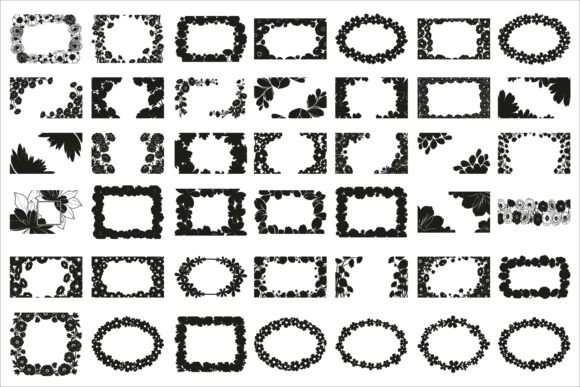
If you attempt to use a raster image for a laser cut flower frame, the machine may struggle to interpret the edges, resulting in jagged cuts or incomplete designs. Always verify that the bundle includes the specific vector format your software requires. A comprehensive pack should offer multiple formats, such as the 42 SVG, 42 PNG, and 49 EPS files found in high-quality collections, ensuring versatility across different platforms.
Avoiding Overly Complex Designs for Cutting
While an ornamental botanical frame with intricate vines and tiny leaves looks stunning on a screen, it can be a nightmare for physical production. A frequent error is choosing a design with too many small, disconnected elements for a vinyl cutter or laser engraver. These delicate parts may tear during weeding or fall out during the cutting process.
To avoid this, examine the flower frame cut file closely before purchasing. Look for designs where the elements are connected or thick enough to withstand the cutting process. If you are creating a wedding floral frame for a paper invitation, finer details are acceptable. However, for a wooden sign or metal plaque, opt for a bolder botanical frame vector with fewer internal cutouts. Testing a small section of the design on scrap material is a prudent step that can prevent ruining expensive media.
The Importance of Clean Paths and Nodes
Not all vector files are optimized. Some free or low-quality downloads contain thousands of unnecessary anchor points, which can slow down your software and cause glitches in cutting machines. When you open an elegant floral frame svg, check the path structure. A well-designed file will have smooth curves and minimal nodes.
If you notice jagged edges or excessive points in your design software, the file may need cleanup. This is particularly important for floral engraving designs where precision is key. Poorly constructed paths can lead to uneven burns in laser cutting or inconsistent pressure in foil stamping. Investing in professionally crafted bundles ensures that the decorative flower outline is clean, closed, and ready for immediate use.
Matching Style to Purpose
Another overlooked aspect is stylistic consistency. A vintage flower frame with heavy, ornate details may clash with a modern, minimalist brand identity. Conversely, a simple geometric floral border might look underwhelming on a formal wedding suite. Before selecting a romantic floral border, consider the overall aesthetic of your project.
Ask yourself:
- Is the design intended for print or digital use?
- Does the level of detail match the scale of the final product?
- Will the frame complement the text or other elements without overpowering them?
For example, a floral label frame used for product packaging needs to leave ample space for branding and legal text. In contrast, a botanical wall decor svg can be more expansive and decorative. Choosing the wrong style can result in a disjointed presentation that fails to communicate your intended message effectively.
Licensing and Commercial Use
Many creators inadvertently violate licensing agreements by using personal-use files for commercial products. If you plan to sell items featuring your decorative floral wreath, such as printed mugs, t-shirts, or physical invitations, you must ensure the license permits commercial use. Reputable sources, including platforms like Creative Fabrica, clearly state usage rights.
Always read the terms associated with your floral frame bundle. Some licenses allow unlimited sales, while others have caps on the number of units you can produce. Ignoring these details can lead to legal issues and account suspensions on selling platforms. Protect your business by verifying that your botanical clipart svg is cleared for the intended commercial application.
Practical Tips for Best Results
To maximize the utility of your elegant floral frame silhouette, consider these best practices:
- Layer Wisely: When using multiple frames or combining them with text, ensure proper layering in your design software to avoid unexpected overlaps.
- Check Color Modes: For print projects, convert your black white floral frame to CMYK color mode to ensure accurate reproduction. RGB is suitable for screens but may appear dull when printed.
- Test Cut Small: Always perform a test cut on a small portion of the design to verify settings before committing to the full project.
- Organize Your Assets: Keep your floral decoration vector files organized by style and format. This saves time when searching for the perfect classic botanical frame for future projects.
By paying attention to these details, you transform a simple download into a powerful tool for creativity. Whether you are crafting a floral stencil template for painting or designing a printable floral frame for digital distribution, the right approach ensures professional results. Choose quality over quantity, verify compatibility, and respect licensing terms to build a sustainable and efficient creative workflow.